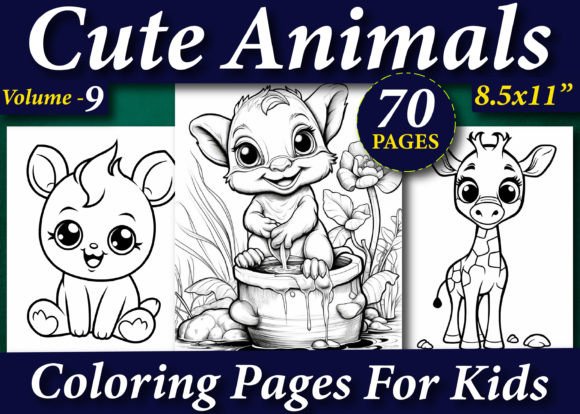
70 Cute Animals Coloring Pages for Kids
If you are building a publishing business on Amazon KDP, you already know that the interior of your book is just as important as the cover. "70 Cute Animals Coloring Pages for Kids" offers a ready-to-use foundation, but how you handle that foundation determines whether your book thrives or gets stuck in review. Many sellers jump into uploading with very little technical preparation. This article covers the common pitfalls publishers face when using these interiors and how to sidestep them for a smoother, more profitable launch.
Why a High-Resolution Interior Matters More Than You Think
One of the most frequent mistakes beginners make is assuming any image that looks good on a screen is ready for print. A picture might appear sharp on your monitor, but at 72 DPI (standard for web), it will print blurry and pixelated. This pack provides 300 DPI images in multiple formats. This is not a minor detail. It is a technical requirement for Amazon's print-on-demand service. Ignoring DPI leads to poor customer reviews, returns, and potentially a flagged listing.
The included EPS, PDF, and PNG formats give you flexibility, but each has a specific job. Using the wrong format creates extra work and can introduce errors. The vector EPS files, for example, are meant for editing in professional software like Adobe Illustrator. The PNG files are excellent for creating marketing previews or social media posts. For actual upload to KDP, the print-ready PDF is your most reliable option.
Understanding the ".zip File" and Format Confusion
You will receive a .zip file containing all designs. A common error is trying to upload the .zip file directly to KDP. The platform will not accept it. Another mistake is extracting just the PNG files and trying to rebuild the entire book from scratch using basic image software. This often results in shifting margins, inconsistent page sizes, and a rejected file.
Here is a practical breakdown of how to handle the files correctly:
- PDF file Print ready: This should be your primary upload file. It is already formatted for A4 (8.5x11 inch) with proper bleed and margins. Upload this directly to your KDP dashboard.
- EPS file: Use this for custom edits. Open it in a vector editing program to alter colors, remove backgrounds, or add your author branding.
- PNG Images file 300 dpi: Use these for creating book previews, "Look Inside" images on Amazon, or for testing the layout on screen before committing to print.
Keeping these formats separate and knowing exactly when to use each one saves hours of frustration. The PDF preserves the intended layout, so you do not need to insert each image one by one.
Licensing: The Silent Account Problem
This is where many new publishers make a costly error. The product notes state clearly: "Note You can sell on it only Amazon kindle direct publishing." This means the license is strictly for creating a book on the KDP platform. A common mistake is assuming this gives you the right to sell the same digital files on Etsy, Creative Market, or your own website. It does not.
Another frequent oversight is accidentally purchasing an interior labeled "Personal Use Only" and trying to resell it. That is copyright infringement and can lead to a permanent ban from KDP. Always verify the commercial license before purchasing. The included format here is specifically tailored for KDP, meaning the creator has optimized the bleed, trim, and spine margins for Amazon's unique system. Respecting this license protects your business long-term. If you want to expand to other platforms, look for a broader commercial license specifically for that purpose.
The "Cute" Niche and End-User Experience
The "cute animals" niche is highly competitive. A mistake is thinking that you can just upload any collection of cute pictures and make consistent sales. The quality and style of the illustrations matter immensely. This pack features "70 Victor Illustration Coloring Pages," which indicates a cohesive artistic style. Why does this matter? Buyers look for books with consistent aesthetics. A mix of cartoon styles, photo-realistic images, and simple clip art looks unprofessional. A unified style builds trust and makes the book feel curated.
Furthermore, consider the end user. A child needs pages with clear, thick lines and enough white space. The 300 DPI resolution ensures the lines are crisp. When evaluating an interior, look beyond just the subject matter. Look at the line weight and the complexity. Pages that are overly detailed frustrate younger children, while pages that are too simple bore older kids. The "cute animals" theme works across a wide age range, but you should still target your description carefully toward either toddlers or older children depending on the page complexity.
The Bleed Confusion and Trim Size Selection
"Print ready" usually means the PDF includes bleed. Bleed is the extra space around the edges that gets trimmed off during binding. A common mistake is selecting "No Bleed" in the KDP setup when your file actually has it. If you choose "No Bleed" for a file that includes bleed, the system might reject it or trim the outer edges of your cute animals. This ruins the layout and can cut off ears, tails, or background details.
Always check the trim box in the PDF properties or use the KDP previewer tool to ensure nothing important is cut off. This product is "fully tested in the Amazon Kindle Direct Publishing platform," which means it is designed to pass KDP's checks. However, you must still select the correct paper size (A4 or 8.5x11) and the correct bleed option during setup. Double-checking these two settings prevents a rejected upload.
Pricing Your Interior Correctly
A book with 70 high-quality pages of coloring content has a specific cost structure. A common mistake is under-pricing. New sellers often set a low price to attract buyers, but they do not account for Amazon's printing costs. For an 8.5x11 black and white interior, printing costs are higher than a standard novel. If you price the book at $5.99, your royalty might only be a few cents or even negative.
Use the KDP Royalty Calculator before setting your list price. For a 70-page coloring book, a common competitive price point is $7.99 to $9.99. This covers the printing cost and leaves you a healthy royalty. Pricing too low signals low quality to buyers and hurts your bottom line. Pricing correctly from the start also avoids the headache of changing prices later with existing reviews and sales history.
The "Set It and Forget It" Trap
Having a premium interior like this one gets you 80% of the way there. A mistake is neglecting the other 20%. This includes the book description, category selection, and keywords. Even the best interior will not sell if the listing is weak. Use the provided PNG files to create compelling "Look Inside" images for your Amazon listing. Showcase a few different animals. Write a description that speaks to the benefits: "70 unique designs," "Reduces screen time," "Hours of creative fun."
Another practical step is using the KDP Previewer tool religiously. Even though the PDF is print-ready, always run it through Amazon's system to catch any potential issues with fonts, margins, or images. It takes only a few minutes and can save you from a week-long review delay. Being proactive with your listing and your technical setup separates a professional publisher from a hobbyist.
Practical Checklist Before Hitting Publish
To summarize, here is what you should verify when using an interior pack like "70 Cute Animals Coloring Pages for Kids":
- Format: Are you using the Print Ready PDF for upload? Yes.
- Size: Did you select A4 or 8.5x11 in KDP? Match it exactly to the interior.
- Bleed: Does the PDF have bleed? Select "Bleed" in the KDP setup.
- License: Are you only using this on KDP? Stick to the license terms.
- Content: Is the artwork cohesive? Yes, the "Victor Illustration" style provides consistency.
- Pricing: Did you check the printing cost? Use the royalty calculator.
Addressing these points upfront prevents a rejection from KDP, saves you from negative reviews, and ensures a professional product reaches the customer.
Building a Better Business with the Right Tools
Choosing the right interior is a strategic business decision. By selecting a high-quality, properly licensed, and technically compliant set of pages, you save hours of formatting headaches. "70 Cute Animals Coloring Pages for Kids" removes the heavy lifting of graphic design, allowing you to focus on marketing, branding, and building your KDP catalog.
The included high-resolution illustrations ensure that the buyer receives a beautiful product, leading to better reviews. The 300 DPI and EPS formats give you the power to customize and scale your business. Do not waste time trying to fix bad interiors. Start with one that is built for success.
Final Thoughts
Success on Amazon KDP comes from a combination of smart sourcing, technical precision, and market awareness. A product like this is a fantastic asset, but only if you use it correctly. Avoid the pitfalls of format confusion, licensing violations, and pricing errors. Use the tools provided, respect the platform guidelines, and keep the end customer's experience at the heart of your work. When you do, you turn a simple coloring book into a sustainable product. Watch your file formats, respect the license, and let the high-resolution cute animals do the rest.