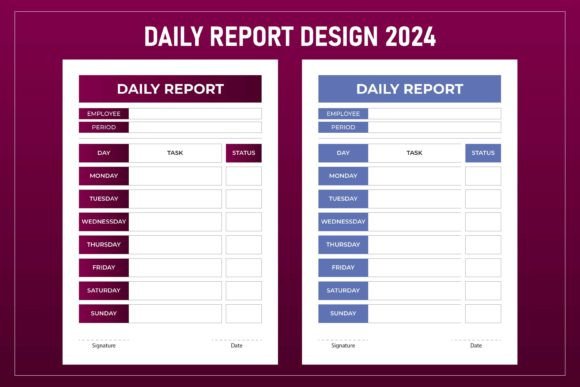
Daily Report Design 2024: Creative Tools for Professionals
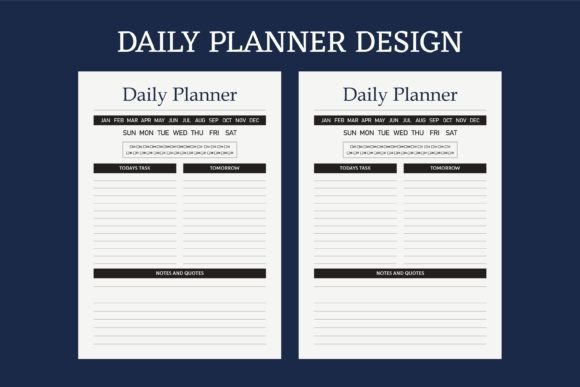
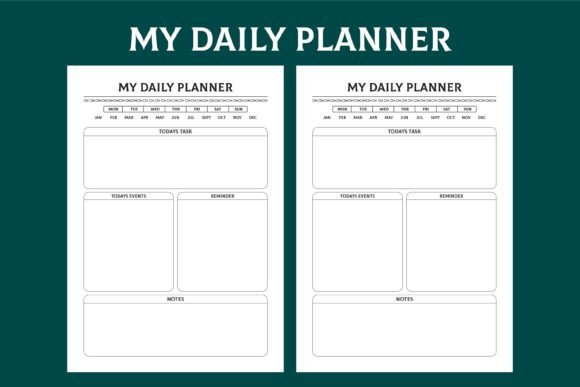
Staying organized while maintaining a visual identity that feels fresh and intentional is a challenge many creators face. The right template can mean the difference between a project that looks rushed and one that looks polished. Daily Report Design 2024 offers a collection of print-ready, fully editable templates built for those who value both structure and flexibility. Whether you are designing a planner, a journal, a diary, or a professional notebook, this resource provides a foundation that saves time without sacrificing quality.
Unlike generic layouts, these designs come in AI, EPS, and vector formats, making them adaptable for a wide range of software and workflows. The inclusion of high-resolution JPG files at 300 DPI ensures that even if you need a quick preview or a straightforward print, you have options. The letter size with bleed is already set, so you can send files directly to print without worrying about margins or cropping issues. For creators who work in Adobe Illustrator, the vector support means every element can be resized, recolored, or rearranged without losing sharpness.
Why Flexible Files Matter for Practical Design Work
When you are producing content for clients or for your own brand, rigid templates often become a bottleneck. You need the freedom to adjust sizing, swap fonts, or change the color palette without starting from scratch. Daily Report Design 2024 addresses this by offering fully resizable vector files. You can scale a design from a pocket notebook to a full A4 journal and the lines remain crisp. This kind of flexibility is especially useful for publishers who test different formats before committing to a print run.
The set also includes PDF vector editable files. This means even if you do not have access to Adobe Illustrator, you can still make adjustments using compatible tools. For small business owners and freelancers who work across different devices and software, this compatibility reduces friction. You are not locked into a single ecosystem. You can open the files, tweak the layout, export, and send to print in a single session.
Print-Ready Details That Save Time
A design file that looks great on screen can fall apart once printed if the bleed, resolution, or color mode is off. Daily Report Design 2024 is built with print in mind. Letter size with bleed means the design extends slightly beyond the final cut line, preventing white edges after trimming. The 300 DPI resolution ensures text and illustrations remain sharp, even when printed on matte or textured paper. For anyone who has experienced the frustration of blurry prints or misaligned layouts, these specifications eliminate guesswork.
The high-quality JPG previews are also useful for mockups and client presentations. You can drop a JPG into a portfolio or a proposal without worrying about file size or compatibility. This saves time during the approval process and lets you focus on the actual creative work.
Creative Applications Across Different Projects
Because the templates are both structured and adaptable, they can be used in more ways than just daily reports. Here are a few practical directions you can take with this design set.
Planners and Journals for Personal or Client Use
A well-designed planner needs a consistent grid, clear sections, and enough breathing room for notes. The vector layouts in Daily Report Design 2024 can be customized to include habit trackers, weekly overviews, or goal-setting pages. If you are creating a journal for a specific audience, you can adjust the headings, add icons, or change the color scheme to match a theme. For example, a travel journal might use earthy tones and space for location stamps, while a wellness journal might use muted pastels and larger writing areas.
If you are publishing on Amazon KDP, the interior formatting requirements are strict. The files are already set up with proper margins and bleed, which reduces the risk of rejection. You can import the vector files, replace placeholder text, and export as a print-ready PDF without having to rebuild the layout from scratch. This is especially valuable for creators who want to launch multiple journals or planners without spending weeks on formatting.
Notebooks and Diaries for Branded Products
Branded notebooks are popular for corporate gifts, event giveaways, and merchandise. Using Daily Report Design 2024, you can take a standard notebook interior and customize it with a company logo, brand colors, and specific page layouts. The AI and EPS files allow you to work with layers, so you can hide or modify individual elements without affecting the overall grid. For entrepreneurs building a product line, this means you can create a cohesive set of notebooks, diaries, and planners that share a consistent visual language.
If you are a designer offering custom notebook templates to clients, having a base set of vector files speeds up your workflow. You can quickly iterate on variations, show clients different options, and deliver final files in a format they can use directly with their printer. The high-resolution JPGs also serve as quick proofs before moving to the final production files.
Educational and Organizational Tools
Teachers, trainers, and workshop facilitators often need structured sheets for lesson plans, attendance tracking, or progress journals. The clean layout of Daily Report Design 2024 makes it suitable for functional designs where clarity matters more than decoration. You can use the editable PDF format to create forms that participants can fill digitally or print at home. Because the files are vector-based, you can also enlarge individual sections for poster-sized displays without losing quality.
For educators who produce their own classroom materials, having a consistent template reduces visual noise and helps students focus on the content. The original designs in this set avoid unnecessary clutter while still providing enough structure to guide layout decisions. You can spend more time on the content itself and less time aligning boxes and adjusting margins.
Adapting the Set for Different Audiences and Formats
The strength of Daily Report Design 2024 lies in its neutrality. The layouts are professional without being cold, and structured without being rigid. This makes them suitable for a wide range of audiences, from corporate professionals to creative hobbyists.
If your audience is corporate, stick to monochrome or two-color schemes and use the vector files to replace decorative elements with subtle lines or geometric shapes. If your audience is younger or more creative, experiment with gradients, handwritten-style fonts, or accent colors on specific sections. The original designs included in the set provide a starting point, but the real value comes from how you adapt them.
For digital planners, you can import the vector files into note-taking apps or design software and create interactive elements such as hyperlinked tabs or embedded stickers. The high-resolution JPGs work well for backgrounds in apps like GoodNotes or Notability, especially when you want a consistent paper texture effect without the file size of a full vector document.
Keeping Your Designs Clear and Audience-Friendly
When you work with templates that are already well-structured, the temptation is to add too many elements. The most effective daily reports, planners, and journals use white space intentionally. Before you customize, identify the key information your user needs at a glance. For a daily report, that might be the date, the task list, the notes section, and a priority marker. Everything else is optional.
Because the files in Daily Report Design 2024 are fully layered, you can hide sections that are not relevant to your project. If you are designing a minimalist diary, you can remove decorative borders and keep only the date headers and writing lines. If you are designing a detailed project planner, you can duplicate sections to add extra space for notes or timelines. The vector format gives you control without breaking the original grid.
Consistency across a series of products also matters. If you are publishing multiple notebooks or planners, using the same base layout with different cover designs creates a recognizable brand. Customers who buy one product are more likely to trust the quality of another if the interior formatting feels familiar and reliable. The print-ready nature of the files ensures that once you settle on a layout, you can reproduce it across multiple titles without redoing the technical setup.
Practical Recommendations for Getting Started
Begin by opening the AI or EPS file in your preferred vector editing software. Review the layers to understand how the design is organized. Most templates group text, lines, and decorative elements separately, making it easy to replace or remove components. Start with one layout that matches your most common use case, such as a daily log or a weekly spread. Customize the typography, colors, and spacing to fit your brand or project needs.
If you are formatting for KDP, pay close attention to the bleed and margin settings built into the file. Once you have made your changes, export as a print-ready PDF using the same specifications. The files are already optimized for letter size, so you only need to ensure that your printer or publishing platform matches those dimensions.
For those who prefer working directly with PDFs, the vector editable PDF format gives you a lightweight option that still retains quality. You can use tools like Adobe Acrobat or Affinity Publisher to make text edits and minor layout adjustments without learning a full vector application. This is particularly useful for freelancers who need to make quick changes for a client and send a proof within minutes.
Finally, keep a backup of the original files. Because they are vector-based, you can always return to the base design if a customization goes too far or if you want to create a completely different variation later. The 100 original designs in the set give you ample material to draw from, whether you are working on a single project or building an entire product line.
Daily Report Design 2024 is more than a set of templates. It is a practical toolkit that bridges the gap between creative vision and production reality. By starting with files that are print-ready, vector-based, and fully editable, you free up time to focus on the details that make your work stand out. Whether you are designing for yourself, for clients, or for a global marketplace, the combination of flexibility and polish gives you a solid foundation to build on.