Botanical Drawings of Flowers Vector Art: A Practical Guide to Integration, Workflow, and Product Creation
Botanical drawings of flowers vector art offer a unique blend of timeless botanical illustration and modern scalability. Whether you are preparing a digital printable coloring book for adults, designing sublimation templates for home decor, or building a KDP interior that is ready for Amazon, these vector assets fit directly into a production pipeline that rewards consistency, ease of editing, and long-term reuse. Instead of treating these files as isolated illustrations, it helps to understand how they move through planning, creation, refinement, and distribution. This article walks through the practical ways to integrate botanical flower vector art into real workflows, with a focus on the KDP interior package and its companion formats.
What Botanical Drawings of Flowers Vector Art Includes and Why It Matters for Print and Digital Products
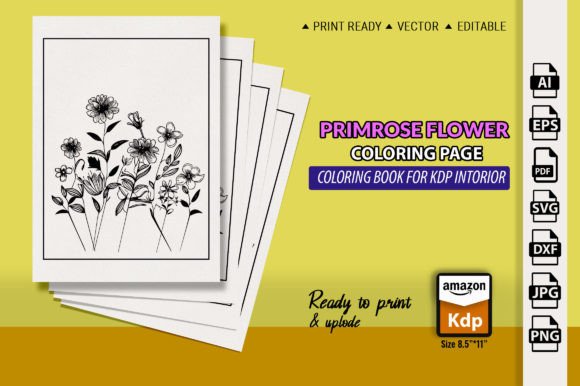
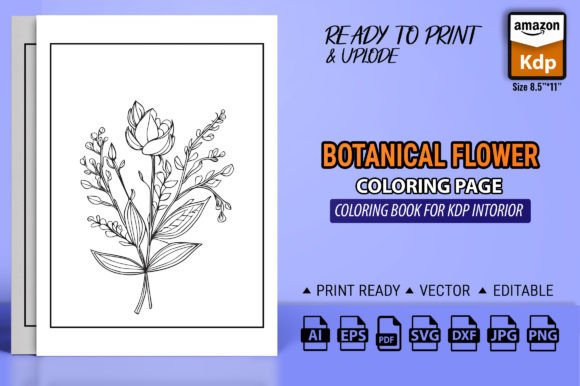
The core offering is a set of vector-based botanical flower illustrations originally drawn in Adobe Illustrator. Designed at 8.5 × 11 inches, the artwork is sized for standard trim sizes used in print-on-demand coloring books. The package includes files in Ai, PDF, EPS, DXF, PNG, SVG, and JPG formats. This range means you are not locked into a single tool, and you can adapt the same design to different output channels without redrawing anything. For someone publishing a KDP interior or creating physical merchandise like mugs, pillows, stickers, and textiles, having multiple vector and raster options saves time and preserves quality across formats.
The botanical style itself works well for adult coloring because it offers detail without excessive complexity—enough linework to engage a user, but structured so that printing on standard paper remains crisp. Because the drawings are vectors, you can adjust line weights, resize elements, or combine illustrations into new layouts without losing sharpness. That flexibility is central to building a product that feels cohesive rather than pasted together.
Where This Vector Art Fits into a Broader Product Creation Process
These botanical drawings sit at the preparation and refinement stages of a product workflow. Before you launch a KDP coloring book, you need a base set of illustrations that are editable, printable, and legally clear for commercial use. The vector files give you that foundation. During the book assembly phase, you can place single flowers or create full-page compositions, adjust margins, add cover designs, and test different color palettes if you decide to include a color guide. After publishing, the same files remain useful for creating marketing materials, sample pages, or derivative products such as greeting cards or fabric prints.
If you are a freelancer or small business owner, these assets also fit into a client-facing process. You might use the EPS or SVG files to produce custom coloring pages for a subscription box, or the PNG and JPG to create mockups for a print shop. The multiformat package reduces the friction of handing off files to printing partners who use different software.
Integrating the Vector Files with Your Existing Tools and Platforms
The strength of this asset set lies in its compatibility with mainstream design applications. The .Ai file opens directly in Adobe Illustrator, giving you full control over anchor points, fills, strokes, and layers. The .EPS and .SVG formats work in free alternatives such as Inkscape or Affinity Designer. The .DXF file is useful if you work with laser cutting or CAD-like software for physical products. The .PNG and .JPG versions are ready for immediate use in Canva, Photoshop, or any raster-based tool.
When preparing a KDP interior, you will most likely use the PDF or Ai file. PDFs preserve vector data and remain the preferred upload format for Amazon KDP. The included PDF is already sized to 8.5 × 11 and can be inserted directly into a book layout with minimal adjustment. If you want to arrange multiple flowers per page or add background elements, import the Ai file and work with grouped objects. A practical tip is to create a template document in Illustrator with your bleed and margin settings, then drag individual botanical elements from the vector file onto each page. This workflow keeps the design consistent and avoids issues with image resolution.
Practical Implementation for a KDP Adult Coloring Book
Building a printable coloring book from these botanical drawings does not require advanced design skills, but a few process decisions will save time later. Start by opening the Ai file and reviewing the layers or object groupings. Most well-prepared vector files separate each flower or leaf so you can move them independently. If the file uses a single layer, use the direct selection tool to select individual elements and copy them to new layers.
Plan your page layout before editing. A typical 8.5 × 11 coloring book uses a page margin of 0.5 to 0.75 inches on each side to account for binding and trimming. Ensure that key details do not fall into the bleed area. Since the vector art is scalable, you can enlarge a single flower to fill the page or arrange several smaller drawings in a grid pattern. This variety keeps the book interesting for the end user. For a 100-page interior, you may need around 50 to 60 unique illustrations with some duplicated in different arrangements.
After finalizing the interior pages, export a print-ready PDF. Use the PDF/X‑1a standard for Amazon KDP to ensure color and embedding compliance. The included PDF in the package serves as a baseline, but you will often need to adjust it for your specific page count and cover. Keep the original vector files unchanged and save each iteration as a new document so you can revert if needed.
Using the Botanical Vector Art for Merchandise, Decor, and Sublimation
Beyond the coloring book, the vector drawings support a wide range of physical products. For sublimation on mugs, tumblers, or pillows, the PNG and SVG formats work best. PNG files with transparent backgrounds let you place a flower directly onto a sublimation template. SVG files remain resolution-independent and can be imported into software like Silhouette Studio or Cricut Design Space for cutting heat-transfer vinyl. If you are designing fabric or textiles, the EPS file opens in vector editing programs that support pattern creation. You can duplicate a flower motif, rotate it, and tile it into a seamless repeat pattern.
For greeting cards or t-shirts, the JPG version provides a quick preview layer, but always work from the vector source when you finalize dimensions. A raster JPG at 300 DPI is fine for a small card, but a shirt print at 12 × 12 inches may require upscaling that loses detail. Vector art avoids that problem. Similarly, when creating stickers, the SVG or Ai file lets you set a cut line around the flower shape. Many sticker printers accept SVG with a dedicated cut layer.
Maintaining Quality and Consistency Across Outputs
One of the recurring challenges with any multipurpose asset is managing consistency in color, line style, and composition across different products. Because these are botanical drawings, the line weight and style are already unified. To keep work consistent, define a base color palette if you plan to offer colored versions. For black-and-white coloring books, ensure that all lines are set to a uniform stroke thickness—typically 1 to 2 points for a coloring book—so the printed results look balanced. Use the Ai file to globally adjust stroke weights before exporting.
Organize your project files in a clear folder structure. Keep the original package ZIP intact as a master copy. Then create subfolders for each product line: “Coloring_Book_Interior_Layouts,” “Mug_Templates,” “Sticker_Sheets,” etc. Within each, store both the working vector file and the final export. This organization reduces the chance of accidentally editing the master file and losing the original.
Another quality factor is print testing. Even though vector files are resolution-independent, the RIP or print driver used by a commercial printer may interpret thin lines differently. Before printing a full batch, send a single page or product to a proof printer. Check that lines are not too thin to reproduce and that the paper or substrate does not cause bleeding. If you are using the PDF for KDP, Amazon’s print-on-demand system handles most vector files well, but always preview the book using the KDP previewer tool before submitting.
Long-Term Usability and Modifications
The bundle includes one AI file, which means the illustrations are delivered as a single document. To maximize long-term usability, consider breaking that file into separate library files. For example, create an Ai file named “Flower_Library.ai” that contains each botanical drawing on its own artboard. This way you can open the library, copy a specific flower, and paste it into a new project without navigating layers. If you are managing multiple products, this library approach prevents duplication errors and keeps your source of truth clean.
You can also modify the vector art to create variations. Change the outline style from solid to dashed for a different look, or add texture fills for a more complex coloring page. Because the shapes are simple botanical forms, they take well to overlays, gradients, and pattern fills if you later want to produce a colored version of the interior. These modifications are best done in the original Ai file or a copy of the EPS, as the SVG and DXF may have simplified structure.
For educators or bloggers, the PNG files with transparent backgrounds are ideal for digital content. You can insert them into PDF worksheets, blog post images, or slide presentations. The JPG version works as a quick thumbnail. Having the SVG available also allows you to convert drawings into fonts or icon sets using font-creation software, though that requires additional tools.
Workflow Example: From ZIP File to Published KDP Coloring Book
To illustrate a practical sequence, here is one realistic workflow using the botanical vector art:
- Download the ZIP file. Extract all formats onto your computer into a folder called “Botanical_Vector_Master.”
- Open the Ai file. Review the structure. If flowers are grouped, ungroup them and label each object with a name (Rose, Leaf, Stem).
- Create a new Illustrator document sized 8.5 × 11 inches with 0.125-inch bleed on all sides. Set margins using guides at 0.75 inches from each edge.
- Copy one flower into the new document. Scale it to about 7 inches wide and center it. Add a second flower on a second page by repeating the process. Aim for 50 pages of content.
- After arranging all pages, export each page as a separate PDF or save a multipage PDF using the Illustrator “Save As” PDF with the “Preserve Illustrator Editing Capabilities” option checked for backup.
- Open the multipage PDF in Adobe Acrobat and reorder pages if needed. For extra polish, add a blank page after each coloring page to prevent bleed-through if the book is printed on one side.
- Upload the PDF to Amazon KDP. Set trim size to 8.5 × 11, interior type to black & white, paper color to cream or white. Use the KDP previewer to confirm margins and placement.
- Once published, reuse the Ai file to create mockups: export a PNG of one page, place it onto a tablet image, and use that for social media promotion.
This sequence assumes you are comfortable with Illustrator, but similar steps work with Inkscape using the SVG or EPS files. The key is to treat the vector drawings as a modular system rather than a finished product—your modifications and layouts are where the value deepens.
Botanical drawings of flowers vector art deliver a foundation that serves both creators who want a ready-to-print solution and those who need scalable artwork for multiple channels. By understanding how the files interact with your design tools, how to organize them for long-term use, and how to tailor them for specific products like a KDP coloring book or sublimation templates, you turn a simple asset into a consistent part of your production workflow. The formats anticipate real-world constraints—print resolution, software compatibility, and product variety—so you can focus on assembling the final product rather than rebuilding illustrations from scratch.