Canva Editable Goal Planner KDP: A Practical Guide to Choosing and Using the Right Goal Planner
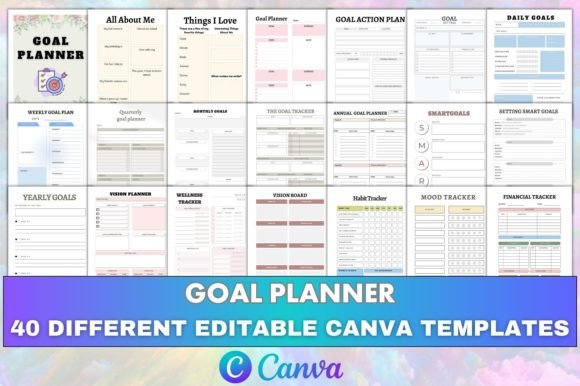
A goal planner is one of those tools that seems simple until you try to use one that doesn't fit your workflow. Many people pick up a planner, fill it out for a week, and abandon it because the layout fights how they actually think. That is where the Canva Editable Goal Planner KDP approach changes things. Instead of being locked into a rigid format, you get a fully customizable set of pages that you can adapt before printing or uploading to Amazon KDP. The collection includes everything from a vision board and SMART goals section to a wellness tracker, travel journal, and even a future resume page. But having all those options means you need to know what you are actually working with and where most people go wrong.
Mistaking Abundance for Clutter
When you open a file that contains forty or more page types, it is easy to feel overwhelmed. You see the yearly overview, the monthly goals, the weekly meal goal, the meeting notes, the order form, and the 30-day challenge all in one place. The natural reaction is to try to use every single page. That is a mistake. A goal planner is not a scrapbook you need to fill completely. It is a tool you customize to match your priorities.
The better approach is to open the editable Canva link and delete the pages you do not need before you do anything else. If you are not planning a trip, remove the travel planner and travel journal pages. If you are not tracking moods, remove the mood tracker. Keep the pages that serve your actual goals for the next quarter. This keeps the file clean, reduces decision fatigue, and makes the PDF you upload to KDP feel intentional rather than bloated.
Ignoring the Difference Between an Editable Source File and a Print-Ready PDF
A common misunderstanding with KDP planners is thinking the editable Canva link and the print-ready PDF are interchangeable. They are not. The PDF is the finished file you upload directly to Kindle Direct Publishing. It is checked for bleed, margins, and resolution so that it prints correctly. The editable Canva link is the working file you use to change colors, fonts, sections, or layout before you export your own PDF.
The mistake people make is uploading the editable version or trying to edit the PDF after it is already formatted. That leads to alignment issues, missing elements, or text that cuts off in the gutter. Always make your changes in the Canva template, then export a high-quality print-ready PDF from there. Check the PDF on your own device before uploading. Look at the margins. Look at the spine width if you are using a perfect binding. These small checks save you from ordering a proof and realizing the habit tracker is cut in half.
Overlooking the Structure of Goal Planning Pages
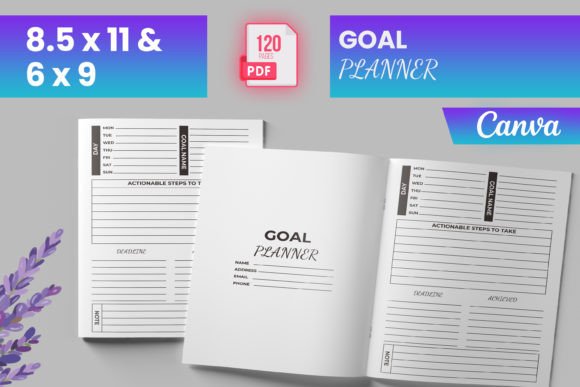
The goal planner section of this collection is not just a single page where you write a wish. It includes a goal action plan, a quarterly goal planner, a weekly goal plan, a SMART goals page, and a goal tracker. Each of these serves a different function in the planning process. The mistake people make is treating them as duplicates. They fill out the SMART goals page and then skip the action plan because it looks like extra work.
In reality, the SMART goals page helps you define what you want specifically. The goal action plan is where you break that into steps. The quarterly and weekly pages turn those steps into a schedule. The goal tracker holds you accountable. If you skip any of these layers, the planner becomes a list of wishes rather than a working system. Use each page as intended, even if you only spend five minutes on the action plan. That five minutes is what turns a vague ambition into something you can actually execute.
Neglecting the Non-Goal Pages That Support Goal Achievement
It is easy to focus only on the pages with the word goal in the title. But the collection includes pages like the wellness tracker, the mood tracker, the financial tracker, and the habit tracker. These are not filler. They are support systems. Your energy level, your mood, your spending, and your daily habits directly affect whether you hit your bigger goals.
One realistic example: You set a fitness goal in the fitness goal page. You also track your habits daily. After two weeks, the habit tracker shows you are sleeping fewer than six hours a night. Your mood tracker shows low energy. The financial tracker shows you are spending money on food delivery because you are too tired to cook. The fitness goal is failing, but the root cause is not the workout plan. It is sleep and budgeting. If you had ignored the support pages, you might have concluded that the fitness goal was unrealistic. Instead, the trackers show you exactly where to adjust. Keep these pages in your planner even if they seem unrelated to your main objective.
Assuming One Layout Works for Every Time Horizon
People often pick one layout and try to force every goal into it. They use the yearly goals page for everything because it looks comprehensive. But yearly goals are broad. Quarterly goals are more specific. Monthly goals are tactical. Weekly goals are operational. Daily goals are execution. Mixing these up creates confusion.
The annual goal planner is for big picture targets like increasing your income by a certain percentage or writing a book. The quarterly goal planner breaks that into three-month chunks. The monthly goals page handles what you will do this month. The weekly goal plan covers the next seven days. And the daily goals page is for today. Use each page at the right interval. Set your annual goals once. Review quarterly goals every three months. Update monthly goals at the start of each month. Plan weekly goals every Sunday. Write daily goals each morning. This layered approach keeps your planner from being either too vague or too micro-managed.
Treating the Vision Board and Dream List as Decoration
The vision board and the page titled My Dream List look like the fun, creative parts of the planner. Many people spend hours finding images and arranging them beautifully but never connect those visuals to the actual goal pages. The vision board becomes a collage rather than a planning tool.
Connect your vision board to the rest of the planner. After you create the vision board, go to the goal setting page and write down what you visualized. Then move to the SMART goals page and make those visions specific. Then use the goal action plan to outline steps. The vision board is the why. The rest of the planner is the how. If you skip the how, the vision board is just a poster. Use the editable Canva link to add text labels to your vision board that point to specific goal pages. That small addition turns inspiration into direction.
Forgetting the Practical Pages for Business and Productivity
The collection includes several pages that are not strictly personal: the business goal page, the meeting notes page, the order form, and the productivity planner. If you are using this planner for work or a side business, these pages are not optional extras. They are essential.
A common mistake is using a separate tool for work planning and another for personal goals. That creates fragmentation. Instead, include the business goal page in the same file. Use the meeting notes page to track action items that connect to your quarterly goals. Use the order form page if you are selling products or services. Keep everything in one place. The productivity planner page is particularly useful for mapping out your week at a glance. Do not hide these pages behind a personal-only mindset. Your goals are not divided into neat categories. Your planner should reflect that.
Underestimating the Value of the All About Me and Things I Love Pages
These pages seem like icebreakers or journaling prompts. But they serve a strategic purpose. The All About Me page helps you clarify your current situation. What are your strengths? What drains you? What are you avoiding? The Things I Love page reminds you what you want to protect and grow.
When you hit a rough patch in your goal progress, these pages help you recalibrate. If your goal is causing more stress than satisfaction, the Things I Love page reminds you what you are actually working toward. The All About Me page gives you a baseline to compare against. Fill these out honestly at the start. Update them when your situation changes. They are not throwaway pages.
Checking for KDP Compliance Before Uploading
All templates in this collection are checked in Kindle Direct Publishing, but that does not mean you can upload without a final review. When you customize the editable Canva link, you might accidentally move a text box, change a font that is not embeddable, or adjust a color that affects contrast. Before you upload, run through the KDP preview tool. Check every page. Look for orphaned text, misaligned borders, and pages that do not center properly.
A practical checklist: Make sure the font size is readable at the trim size you selected. Confirm that all trackers and planners have enough space to write in. Verify that the spine and cover align if you are using a paperback. The files are high quality, but your customizations are your responsibility. One extra proof check can save you from a batch of books that print incorrectly.
Using the Tracker Pages Consistently, Not Perfectly
The wellness tracker, mood tracker, financial tracker, and habit tracker are only useful if you use them consistently. Many people start strong, miss a day, feel guilty, and abandon the tracker entirely. That is the biggest mistake with any tracking system. Perfection is not the goal. Consistency is.
If you miss a day on the habit tracker, leave it blank or mark it with a simple X. Do not go back and fill in the past week from memory. That introduces inaccuracy. Just continue from today. The same applies to the financial tracker. If you forget to log a purchase, skip it and log today's spending. The tracker is a tool for awareness, not a test of your memory. Over time, even imperfect tracking reveals patterns that help you adjust.
Making the Planner Yours Through the Editable Link
The editable Canva link is not just for changing colors. Use it to rearrange page order. Put your most-used pages at the front. Move the meeting notes page next to the business goal page. Place the weekly meal goal near the habit tracker if those are connected for you. Rename sections if the default labels do not fit. Add your own categories. The goal planner should match how you think, not how the template designer thought.
One effective customization is combining the 30-day challenge page with the habit tracker. Use the challenge page to define what you are doing for the month and the habit tracker to mark daily completion. This turns a vague challenge into a measurable streak. Another idea is pairing the vision planner with the yearly goals page so you see the visual and the written target on facing pages when printed.
The file you upload to Amazon KDP should be the version that works best for your use case, not a generic default. Take the time to customize. That is the whole advantage of an editable format. A static PDF forces you to adapt to it. An editable Canva link lets it adapt to you.
A goal planner is only as effective as the thought you put into it before you start using it. The Canva Editable Goal Planner KDP gives you every page you might need, from the annual goal planner to the my notes section, from the bucket list to the saving goals tracker. But having every page means nothing if you do not select, customize, and commit to using the pages that serve your actual priorities. Choose what matters, edit until it fits, check the print-ready PDF carefully, and use the trackers consistently. That approach turns a collection of templates into a personal planning system that actually helps you move forward.