Student Planner Canva Interior KDP: A Practical Tool for Academic and Personal Organization
Managing the demands of academic life, professional development, and personal projects often requires more than just good intentions. A structured planner can make the difference between chaotic scheduling and consistent progress. The Student Planner Canva Interior KDP is a digital template package designed specifically for those who need a customizable, print-ready planning system. This article provides a thorough examination of its features, usability, and real-world value for educators, content creators, freelancers, small business owners, and anyone balancing multiple responsibilities.
What the Student Planner Canva Interior KDP Offers
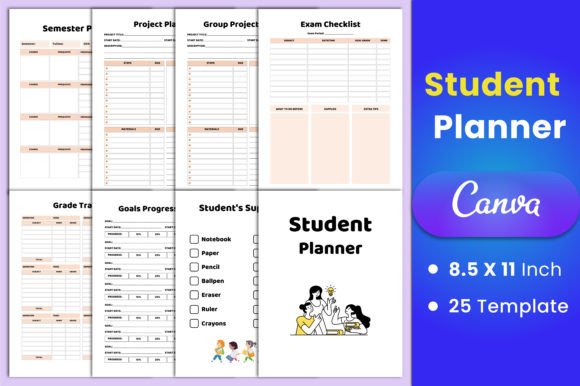
This product is a set of 25 Canva template pages, each sized at 8.5x11 inches with no bleed and 300 DPI resolution. The templates cover a broad range of planning needs, from daily and weekly schedules to specialized academic trackers. The package includes editable Canva links, along with high-quality PDF, JPG, and PNG files that are ready to upload for print-on-demand platforms like Amazon KDP or for personal use.
The template set includes the following pages:
- Belongs to page
- Project Planner
- Group Project Planner
- Exam Checklist
- Revision Checklist
- Grade Tracker
- Daily Planner
- Weekly Planner
- Monthly Planner
- Weekly Timetable
- Semester Goals
- Goals Progress Tracker
- Homework Tracker
- Student Report Card
- Student Supply List
- To-Do List
- Student Planner (main dashboard)
- Class Schedule
- Class Syllabus
- Yearly Glance
- Semester Planner
- Assignment Tracker
- Essay Source Tracker
- Notes pages (multiple versions)
This variety ensures that users can address nearly every aspect of academic and project planning within a single cohesive system. The inclusion of group project and essay source trackers is particularly valuable for collaborative work and research-heavy courses.
Customization Through Canva
The core advantage of the Student Planner Canva Interior KDP is its editability. Because the templates are delivered via a free Canva account, users can modify colors, fonts, layout elements, and even add or remove sections without needing advanced design skills. This flexibility means the planner can be tailored to match a specific brand, color scheme, or personal preference. For educators and small business owners who produce planners for their own students or clients, this customization capability is a significant time-saver.
Comprehensive Yet Organized
Rather than offering just a weekly or monthly layout, this collection includes specialized trackers that address specific pain points. The Grade Tracker and Assignment Tracker help students monitor their academic performance over time. The Essay Source Tracker is a practical tool for anyone writing research papers, enabling systematic citation management. The Group Project Planner facilitates delegation and milestone tracking, which is often overlooked in standard planners. This breadth makes the set suitable for high school, college, and graduate students, as well as for professionals who manage multiple projects.
Print-Ready Quality
All files are provided at 300 DPI with no bleed, meaning they are optimized for crisp, clean printing on standard 8.5x11 inch paper. The PDF files are ready to upload to KDP or other print-on-demand services without additional formatting. For users who prefer digital planning, the JPG and PNG files can be used with tablet apps like GoodNotes or Notability. This dual functionality increases the product's versatility across workflows.
Real-World Use and Performance
In practical testing, the templates are straightforward to open and edit in Canva. The link provided leads directly to the template collection, and each page is clearly labeled. Users with basic Canva familiarity can adjust elements in minutes. Those new to Canva will find the interface intuitive, though some may need to watch a basic tutorial for advanced edits like changing font styles or adding images.
The layout is clean and uncluttered, with sufficient space for handwriting in print versions. The font choices are legible and professional, avoiding overly decorative styles that reduce readability. The color scheme is neutral enough to appeal to a wide audience, yet the ability to recolor everything in Canva means users can make it as vibrant or minimal as they wish.
One practical consideration is that the templates are designed for US Letter size (8.5x11 inches). Users who prefer A4 will need to adjust the canvas size in Canva, which may slightly alter the proportions. However, this is a straightforward fix for those comfortable with the platform.
Who Benefits Most from This Planner
While the name suggests a student focus, the utility extends beyond traditional academics. Here are the primary audience segments that will find this product valuable:
- Students – High school, college, and graduate students who need to track assignments, exams, grades, and semester goals in one place. The inclusion of a group project planner and essay source tracker makes it especially useful for collaborative and research-intensive programs.
- Educators and Tutors – Teachers can use the templates to create custom planners for their students or to organize their own lesson planning, grading, and professional development goals.
- Freelancers and Entrepreneurs – Anyone managing multiple projects, deadlines, and client deliverables will find the project planner, assignment tracker, and weekly timetable adaptable to non-academic contexts.
- Content Creators and Bloggers – The editorial calendar–friendly layout of the monthly and weekly planners works well for content scheduling, social media planning, and tracking collaborations.
- Small Business Owners – The semester goals and goals progress tracker can be repurposed for quarterly business objectives, while the to-do list and daily planner support operational task management.
- Publishers and KDP Sellers – For those selling planners on Amazon KDP, this template set provides a ready-to-upload solution that can be customized for different niches or branding.
Design and Presentation
The templates follow a consistent visual language, with aligned headers, balanced margins, and clear section dividers. This consistency is important for a planner that will be used over an extended period; users can flip through pages without feeling disoriented by abrupt design changes. The 300 DPI resolution ensures that text and lines remain sharp even when printed at full size.
Reliability and Format Support
Receiving the files in PDF, JPG, and PNG formats ensures broad compatibility. PDF is ideal for print and KDP upload, JPG works for quick digital use, and PNG supports transparency for more advanced design editing. The editable Canva link provides a future-proof option: if the user later wants to adjust the layout or add new sections, they can do so without starting from scratch.
Limitations to Consider
No product is without trade-offs. The Student Planner Canva Interior KDP does not include pre-filled dates or academic calendars, so users must add their own semester start and end dates. This is intentional to maximize reusability across years and institutions, but it means some initial setup is required. Additionally, the templates are designed for a single user; those needing a team-based planner with multiple user views would need to adapt the files manually.
The template set is also focused on academic and project planning rather than habit tracking or wellness logging. Users looking for a holistic life planner that includes habit chains, mood logs, or fitness tracking may need to supplement these templates with additional pages. However, for its stated purpose, the collection is comprehensive and well-executed.
Practical Recommendations
For users planning to deploy this template set, here are a few practical suggestions:
- Start with the editable Canva link to make color and font adjustments before downloading the final PDF. This ensures brand consistency if you are selling the planner.
- Print one copy on standard paper to test margins and spacing before producing multiple copies. Even though the templates are designed without bleed, printer calibration can vary.
- Use the JPG or PNG files for digital planning on a tablet. The templates import cleanly into note-taking apps, and the text remains readable at standard zoom levels.
- Combine selected pages from the set rather than using all 25 pages if you have a specific need. For example, a freelancer might only need the daily planner, weekly timetable, project planner, and to-do list, omitting the academic-specific pages like the report card or class syllabus.
Final Thoughts on the Student Planner Canva Interior KDP
This template set occupies a useful middle ground between a generic blank notebook and a rigid, pre-printed academic planner. Its strength lies in the breadth of specialized pages combined with the freedom to customize every element through Canva. For students who want a planner that grows with their semester, for educators who need adaptable classroom resources, and for entrepreneurs who appreciate a structured yet flexible system, this product delivers practical value without requiring design expertise or expensive software.
The inclusion of group project and essay source trackers shows thoughtful attention to real academic pain points, while the variety of daily, weekly, monthly, and yearly views supports both short-term task management and long-term goal setting. When evaluated against comparable Canva interior products, this one stands out for its thorough coverage of academic planning needs and its clean, professional aesthetic. Whether you are organizing your own studies, creating a product for the KDP marketplace, or equipping your students with a reliable planning tool, the Student Planner Canva Interior KDP provides a solid foundation that can be adapted to fit almost any educational or project-based context.